How to Reset Justworks Password if Forgotten

Did you know the average person has 100 passwords to remember? Memorizing so many logins is a pain — not to mention you'll inevitably forget a password or two this year and have to reset them.
If you can't recall your Justworks details, you've come to the right place. This quick guide will tell you what to do next. You should be able to log in to your account again in a few minutes.
TeamPassword is not associated with JustWorks and cannot help you reset your password.
Table of Contents
Reset Your Password
Here's a step-by-step guide for resetting your Justworks password:
1. Go to the Login URL
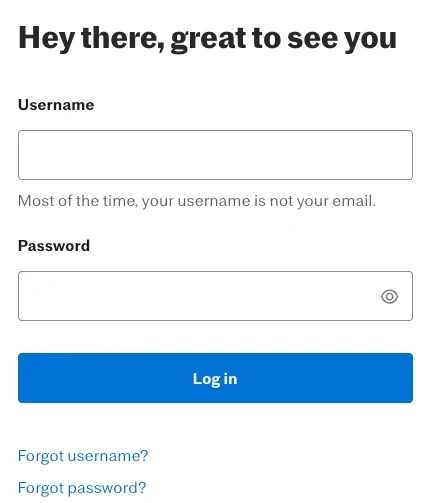
Start by clicking this link or copying and pasting the URL into your internet browser:
This is Justworks' authentic login page, where you enter your username and password to access your account. However, you can also reset your password from this page. Next, click the 'Forgot Username or Password?' link. (It's under the blue 'Login' button.')
2. Enter Your Email
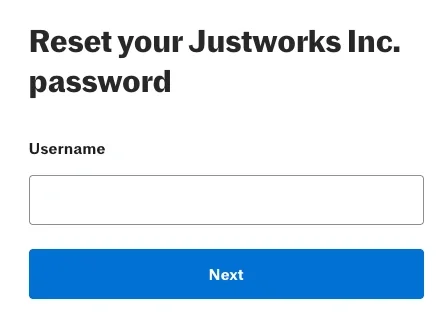
Enter the home or work email address linked to your account on the Reset Your Password page. Then click 'Send Verification Email' and wait for it to appear in your inbox.
3. Go to Your Email
Log in to your email account, and click on the link inside the message you received from Justworks. That will take you to a new page where you can reset your password. You are on the authentic Justworks website if you see a padlock symbol in the URL bar in your internet browser, which signifies that it's safe to enter your personal information.

4. Enter Your New Password
Now it's time to enter a new password for your Justworks account. You'll have to enter it twice on this page. If you suddenly remember your old password, you won't be able to use it again.
Creating a Secure Password (That You Can Actually Remember)
If you find yourself constantly clicking "Forgot Password," forcing yourself to memorize a random string of symbols and numbers isn't the solution. Instead, try using a passphrase. A passphrase strings together three or four random, unrelated words (for example, Purple-Coffee-Window-Desk!). It is mathematically highly secure, but much easier for your brain to visualize and remember than something like x$9Qz!p2.
Related Reading: Password Best Practices
Never Forget a Login Again: Improve Your Password Management
The absolute best way to stop forgetting your passwords is to stop trying to remember them in the first place. By adopting a secure password manager, you only need to remember one strong "Master Password." The manager acts as an encrypted vault for everything else, ensuring you'll never be locked out of Justworks on payday again.
Use Browser Extensions for Seamless Auto-Fill
A password manager is great, but a password management browser extension is what makes your daily life easier. Once installed, the extension will automatically detect when you navigate to the Justworks login page and autofill your credentials for you. No typing, no copying and pasting, and absolutely no memory required.
Let a Secure Password Generator Do the Heavy Lifting
When you rely on a password manager with an integrated secure password generator, you don't even need to know what your Justworks password is. The tool will auto-create a massive, unguessable string of characters and save it for you automatically. You get maximum security with zero memorization.
A Quick Note on Password Sharing
While you should never share your personal Justworks login (since it contains your sensitive HR, payroll, and direct deposit information), you likely have other shared work accounts. If you and your coworkers struggle to keep track of logins for shared software or social media accounts, a team password manager lets you securely share access without passing around vulnerable spreadsheets.
Try TeamPassword Today
TeamPassword cannot help you reset your JustWorks password. Follow the above instructions or contact JustWorks directly.
Forgetting your Justworks passwords can be a headache. But you can solve this problem by following the simple steps above. To prevent this issue from happening again, invest in a password management tool.
TeamPassword is the password management solution you've been looking for. Sign up today, and never reset Justworks password again!
Posts Recomendados
The 5 Best Enterprise Password Vaults (2026 Comparison)
Standard password tools fail at enterprise scale. Learn how to choose a password manager for security, compliance (SOC ...
How to Reset ADP Password if Forgotten
Reset your ADP password with this easy-to-follow guide. Discover tips for choosing memorable security questions and creating secure ...
How to Reset a WordPress Password
Can't remember your WordPress password? Don't fret! Use this easy step-by-step guide to reset your WordPress password.
Fortaleça a segurança das suas senhas
O melhor software para gerar e gerenciar suas senhas corretamente.